The Mars 2020 rover has a launch window of July 17 – August 5, 2010. You need to submit your name by September 30, 2019 at 11:59 p.m. ET in order to be included on a tiny microchip that will be attached to the rover.
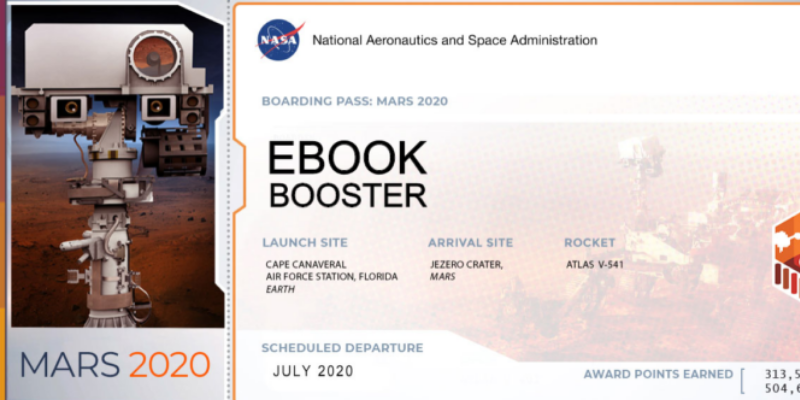
After you submit your name, you will get an official souvenir boarding pass, suitable for framing or sharing on your website/social media.
Here is what a boarding pass looks like:
All names will be etched on a silicon waver or microchip. NASA uses an electronic beam machine that can etch microscopic letters as small as 1 micron (less than width of a human hair).
Please note all names are subject to review. If you pass the reviewers, your name will officially land on Mars on February 18, 2021!
If you’re on a budget and are looking for free software to write your next book on, we’ve scoured the Internet and have compiled a list of free novel writing software for Mac, PC, Android, IOS and Linux.
Programs that have free trials or links to “upgrade” are not included as many times they only provide partial functionality – even though they still might be good 🙂
In this article we’ll only feature the free stuff. In no particular order, here we go:
– Almost everyone has a Gmail/Google account, so why not use their built in word processor to write a book? Google Docs will auto save as you write, so you don’t have to worry about losing your creative work. You can even export ebook in .epub format! Works on any computer that is online – so you can continue working on your novel at home, work or while traveling.
One really great feature with Google Docs is the Google Voice Typing dictation feature. Just sit back, relax and start talking. Google Docs will translate your speech to text. Edit as needed later.
Here’s a video tutorial on writing a book on Google Docs:
Notepad for Windows
– Well, this may not be the best option, but it is free already installed on your Windows computer.
Just search for “Notepad” on your PC and the program should pop up.
– yWriter is a free writing program by Simon Haynes and is currently available for Windows, Android, iOS and Linux.
“yWriter is a word processor which breaks your novel into chapters and scenes, helping you keep track of your work while leaving your mind free to create”.
Here is a video tutorial by Carey Green which shows you how one author created his book using yWriter:
– This is a cool web based writing app where you can create an account for free. Create characters, chapters and brainstorm your plot from anywhere you can access the Internet. Collaborate and be motived by other writers using the “pals” feature. Here’s a tutorial overview on YouTube…
– Another truly totally free application with versions for Linux, Windows and Mac. Option to tip the creator when you download. What I love about FocusWriter is the distraction free writing feature. Other features include typewriter sound effects, spell checking, timers and more. Here’s a screenshot below… beautiful in my opinion 🙂
– As of December 2017, this software is now free to download, with one catch – it is no longer under development. Even so, it still looks like a pretty good option to write your next novel with features such as dictionaries in multiple languages, organization options, character summaries, search, password protection and more. Available for Windows.
– Available for Windows, it is packed with features such as book organization into acts, chapters and scenes. Outlining, front/back matter pages, dictionary & thesaurus, character profiles, word & page count, statistics, text to speech, RTF, PDF, HTML, .doc & docx export file formats and more.
– To be honest, I couldn’t get this to work when I signed up, but have seen it mentioned many times so am including it on the list. I’ll keep trying to figure it out and perhaps reach out to them to see what I’m doing wrong – or if it requires a paid account. Not sure. I’ll report back and update this post when I get it figured out 🙂
– Originally I thought this was a paid program, but it appears to be free. Personally I have used the paid version in the past, but according to their App store it does indeed appear to be free.
– Just when you thought there were no more apps available, here’s yet another free one. This one is like Word or LibreOffice but specific for EPUB ebooks. Many features including plugins, available for Mac, Windows, Linux. WYSIWYG editing, Metadata editor, spell checking, style sheets and more. Here’s a thorough video tutorial on how to write an ebook using Sigil.
– This is a simple web browser based distraction free writing app that lets you write and save your work as HTML, Markdown or plain text format. Features full screen mode, word count and a darker night mode.
– Free, lightweight, full screen text editor packed with features such as live statistics, page count, portable (use a pendrive if you wish), timer alarm, spell checking, typing sound effects, autosaving and more.
There may be other free writing apps we have not mentioned here, so if you know of one you think should be included, please let us know in the comments below.
We are currently working on this list of ebook submission sites where you can promote your free, bargain and regular priced ebooks. Currently we have 267 websites and promotion services.
Some will consider posting your ebook for free, others may require payment to be listed.
It will take some time for us to go through the entire list, but will be adding a brief summary of the services they offer in the column to the right of each web site.
Here are some eBook submission sites where authors can submit their eBooks for free or for a fee:
Amazon Kindle Direct Publishing (KDP): KDP is Amazon’s self-publishing platform, and it allows authors to publish eBooks and paperbacks and make them available for sale on Amazon. Authors can enroll their eBooks in KDP Select program and use promotional tools to reach more readers.
CraveBooks.com: is a website that offers a range of free and discounted eBooks for readers. The site features a curated selection of eBooks in various genres, including romance, mystery, sci-fi, and fantasy. Readers can sign up for the site’s email list to receive notifications about new eBooks and special deals. CraveBooks.com also features a blog with articles about reading and writing, as well as interviews with authors. The site does not require readers to sign up or create an account to access the eBooks, but users can sign up for a premium membership to receive additional benefits, such as access to exclusive content and discounts on eBooks. Overall, CraveBooks.com is a useful resource for readers looking for free and discounted eBooks in a variety of genres.
Smashwords: Smashwords is an eBook distribution platform that allows authors to publish and distribute their eBooks to major retailers like Apple Books, Barnes & Noble, and Kobo. Smashwords also offers marketing tools and resources to help authors promote their eBooks.
Draft2Digital: Draft2Digital is another eBook distribution platform that allows authors to publish and distribute eBooks to major retailers. Draft2Digital also offers formatting and conversion services and provides authors with a range of marketing tools and resources.
BookBaby: BookBaby is a self-publishing company that offers a range of services, including eBook distribution, print-on-demand, and marketing services. Authors can submit their eBooks to BookBaby for distribution to major retailers like Amazon, Apple Books, and Barnes & Noble.
Lulu: Lulu is a self-publishing company that allows authors to publish and distribute eBooks, print-on-demand books, and other products. Lulu offers a range of distribution options, including distribution to major retailers like Amazon, Apple Books, and Barnes & Noble.
eBookPartnership: eBookPartnership is a global eBook distribution service that helps authors and publishers distribute eBooks to major retailers around the world. eBookPartnership also offers eBook formatting and conversion services, as well as marketing and promotional tools.
In conclusion, these are some of the popular eBook submission sites that authors can use to publish and distribute their eBooks. Each platform offers different services and pricing options, so authors should research each one to determine which is the best fit for their needs.
On Amazon, “Permafree” means exactly what you think – permanently free. Authors do this occasionally to give away one of their titles with the hope that it will help promote their other books, so making your ebook permafree sometimes can bring nice, long term sales other related titles.
So, How Do You Make Your eBook Permafree on Amazon?
The quick answer is to remove your ebook out of KDP/Kindle Unlimited and upload it for free to a competing ebook platform such as Smashwords, Apple iBooks, Nook, Kobo, etc. Then go to your ebook’s page on Amazon and look for the “tell us about a lower price” link. Once there, fill out the form to notify Amazon of the locations where the ebook is priced for free.
You may want to have friends & family do the same to increase the odds of success.
(Note: If you have already made your ebook permafree and would like to add it to PermaFree.com, please click here to do so)
As a final option, some recommend that you contact Amazon KDP support directly, but my gut tells me this could be risky. I’ll do more research on this and see if I can find out if it is a real risk or if there’s nothing to worry about. It’s just one of those things.. sometimes it’s better to stay under the radar a bit instead of being an annoying mosquito. 😀
Step 1: Take Your eBook Out of KDP/Kindle Unlimited
Assuming your ebook is already published on Amazon, the first step you want to take to get your ebook permanently priced for free is to make sure it is removed from KDP/Kindle Unlimited.
Log into your Kindle Direct Publishing account and look for the book title you want to make permafree. On the right side, you should see “KINDLE EBOOK ACTIONS” and a “Promote and Advertise” button underneath. To the right of that is another tiny button with three dots. Click that and select “KDP Select Info”.
Step 2: Upload Your eBook to Other Retailers (iBooks, Nook, etc.)
Next you will want to upload your eBook to other competing platforms such as iBooks, Nook, Smashwords, Kobo, Scribd, etc. You can do this yourself or use a third party service.
Make sure you set your ebook price to $0.00 after you upload. These competing retailers will be used when notifying Amazon of where your ebook is available for free.
Here are links to these platforms for your convenience:
Step 3: Notify Amazon of Your eBook’s Lower Price on Other Platforms
Go to the Amazon page where your ebook is located and scroll down under “Product Details”. You will see all sorts of other information including File Size, Publication Date, Language, Amazon Best Sellers Rank, etc. Below that you should see a link that says “Would you like to tell us about a lower price?”.
Simply fill out the form and follow the instructions. Since you have uploaded to a competing platform, you will want to select “Website (Online)” and provide the URL to one of the competing sites where your eBook has been published. Include price, shipping and date of price.
Once you have reported a lower price, then you need to sit back and wait. Be patient and don’t overdo it… reporting over and over. Amazon knows all and will likely see you logged in, doing this. Once should be enough (for you).
Over time, ask friends and family members to do report the price as a favor for you. The best case scenario is to have people report the free price that are in no way linked to your account. Example is if you have sent gifts to family members on Amazon, their reports of a free price may not have as much credibility as a distant stranger.
Other actions you can take to increase your chances include contacting Amazon KDP directly, giving them the same information as in the form posted above. Include a URL to where the book is available for free, your ASIN number, dates available free, etc. I do question if this should be done from the actual author (you) and the same email you use in your KDP account. Personally, I don’t know if I would do that. Probably a better idea to have a friend email them instead, but that’s just me. I’ll do more research on this and see if there is any risk involved that could negatively impact your KDP account.
And, that’s about all there is to it. To verify this still works (as of June, 2018), I am going to test all of the above steps to verify that they still work and get a rough idea of how long the entire process takes. Stay tuned and bookmark this post.
Advantage of Permafree on Amazon
Making your eBook permafree on Amazon can offer several advantages for authors, including:
Increased Visibility: Permafree books are often listed at the top of Amazon’s free books chart, making it easier for readers to discover your book. The increased visibility can help attract new readers who may not have found your book otherwise.
More Reviews: When readers download your book for free, they’re more likely to leave a review. This can help increase the number of reviews on your book’s page, which can in turn increase its visibility and attract even more readers.
Building a Fan Base: Permafree books can help you build a fan base of readers who enjoy your writing style and may be interested in purchasing your other books. By offering one of your books for free, you’re providing readers with a low-risk way to try out your writing and potentially become loyal fans.
Marketing Tool: Making your eBook permafree can be a useful marketing tool to promote your other books. You can include links to your other books in the front and back matter of your permafree eBook, encouraging readers to check out your other titles.
Competitive Advantage: Making your eBook permafree can give you a competitive advantage over other authors in your genre who are charging for their books. By offering your book for free, you’re providing readers with a unique value proposition that can help you stand out from the crowd.
In conclusion, making your eBook permafree on Amazon can offer several advantages for authors, including increased visibility, more reviews, building a fan base, marketing tool, and competitive advantage. While you may not earn royalties on permafree books, the benefits of increased visibility and potential for future sales can make it a valuable marketing strategy.
Website is easy to use and it's a brilliant idea to have a big list of deal sites in different genres at reasonable prices that authors can tag as a "go-to" for their promotions. Every promotion that I've done so far has gotten pretty good results and I would use again.